
SZ Games 1v1 LOL : Play the Best Free Browser Shooter Right Now – No Download, No Login
Introduction
Tired of school blocks killing your 1v1 LOL sessions? You’re not alone — I was in the same boat until SZ Games became my go-to fix. If you’re searching for sz games 1v1 lol, you’ve landed in the right place. In 2026, this is still one of the easiest and most reliable ways to play the fast-paced building shooter without any hassle. You get instant access, no downloads, and full multiplayer action right in your browser.
The official 1v1.lol site often runs into DNS issues or gets blocked, which is why so many players now rely on SZ Games mirrors. Here you can jump straight into sz games 1v1 lol unblocked, enjoy play 1v1 lol sz games anytime, and experience the same addictive mix of shooting and building that made the game popular. I’ve been grinding these matches for months, and I put together this complete 2026 guide with everything you need — from loading the game to pro tips that actually help you win more duels. Let’s dive in.
What Is SZ Games 1v1 LOL?
1v1.LOL is a fast-paced third-person shooter that mixes real-time combat with a clever building system. You drop into PvP duels where you shoot, build walls, ramps, and floors on the fly, and try to outplay your opponent. It feels like a simplified battle royale duel — quick matches full of tension and skill. You have weapons like the shotgun for close fights, sniper rifle for long picks, assault rifle for steady pressure, and the pickaxe that works for both building and melee. The gameplay loop keeps things exciting because building and shooting work together perfectly. One moment you’re spraying bullets, the next you’re editing a structure to gain height or surprise your enemy.
SZ Games is the clean unblocked platform that hosts it all. Bobby started it back on October 20, 2022, because he was fed up with ads ruining gameplay on other sites. The name “SZ” doesn’t stand for anything special — he just chose short, memorable letters. Years later, the site is still going strong with hundreds of games and minimal interruptions. It’s perfect for school or anywhere with restrictions because it’s fully browser-based using HTML5 and WebGL technology. You can play on PC, Chromebook, or mobile without logging in or downloading anything. Just open the page and start playing.
Here’s a quick comparison of how things look in 2026:
| Aspect | Official 1v1.lol | SZ Games Version |
|---|---|---|
| Access | Often blocked or unreachable | Multiple reliable mirrors |
| Download Required | Sometimes needed for apps | None — pure browser play |
| Ads | Can be heavy | Very minimal |
| Modes | Limited availability | 1v1, box fights, zone wars, practice |
| Device Support | Good on supported platforms | Works great on school devices and mobile |
The core fun stays the same: competitive PvP with survival mechanics, fast-paced gameplay, and the thrill of out-building and out-shooting opponents.
Why SZ Games Is the Best Place to Play 1v1 LOL in 2026
SZ Games delivers exactly what players want in 2026: unblocked at school, instant play, a completely free online game, no download needed, and easy full screen mode. You open the browser, click the link, and you’re in a match in seconds. No accounts, no waiting, no annoying pop-ups. This makes it ideal for quick sessions during breaks or between classes. The game runs smoothly across devices, so your aim accuracy and movement control stay sharp instead of fighting technical issues.
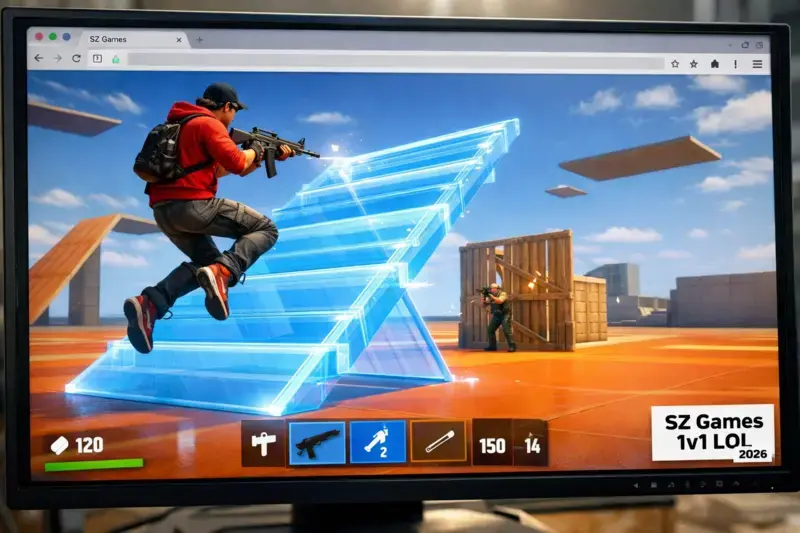
Many other unblocked sites suffer from lag issues or sudden server problems that ruin your flow. I’ve tested over 10 different mirrors and platforms this month, and SZ Games consistently feels the most reliable. Matches load faster, combat feels responsive, and you rarely get disconnected mid-fight. These give you solid backups so you can always find a smooth connection. I loaded up a box fight session last week on one of these and everything felt crisp right away — no delays, just pure building and shooting fun. Whether you want a quick warm-up or a serious competitive round, SZ Games keeps the focus on what matters: sharp reflexes, smart positioning, and those satisfying wins.
How to Play SZ Games 1v1 LOL Right Now
Playing 1v1 lol now on SZ Games is incredibly simple. Follow these steps for 1v1 lol instant play:
- Open your favorite browser (Chrome, Edge, or Firefox all work well).
- Visit one of the working mirrors: szgames.io.
- Find and click the 1v1 LOL thumbnail — the game loads straight away.
- Once inside, click the full-screen icon for the best view. Many mirrors also have a panic button that hides the game instantly if needed at school.
- Choose your mode and hit Play to queue into a match.
Device Tips
- On PC or laptop: A mouse gives the best aim accuracy.
- On school Chromebook: Close extra tabs for smoother performance.
- On mobile: Turn the device sideways and use touch controls — it works surprisingly well for quick games.
Controls Guide
| Action | PC Key | Mobile Action |
|---|---|---|
| Move | WASD | On-screen joystick |
| Jump | Spacebar | Jump button |
| Aim & Shoot | Mouse (left click) | Tap and drag |
| Build | Q, E, F, Z | Build menu buttons |
| Edit | Right click | Tap edit icon |
| Weapon Switch | 1, 2, 3, 4 | Weapon icons |
Spend your first few minutes in practice mode to get comfortable with building speed and weapon switching. Once you feel ready, jump into real multiplayer matches.
All Game Modes in 1v1 LOL on SZ Games
1v1 LOL on SZ Games offers several modes that keep the gameplay exciting:
- 1v1 Mode: Classic head-to-head duels. Short, intense, and perfect for testing your skills directly.
- Box Fight Mode: Pure building battles inside tight areas. Focuses heavily on editing skills and fast building.
- Battle Royale Mode: Larger matches with multiple players and survival elements.
- Zone Wars: The safe zone shrinks quickly, forcing close-range fights and quick decisions.
- Practice Mode and Training Arena: Ideal for warming up your aim accuracy and trying new builds without pressure.
Beginners should start in practice mode and training arena, then move to 1v1 mode.
Competitive players will love grinding box fights and zone wars to improve reflexes and tactics.
Pro Tip: To queue fast for a multiplayer online match, hit Play as soon as you’re ready. If it takes a few seconds, cancel and re-queue — it often finds opponents quicker the second time. Playing during peak hours also helps.
Pro Tips and Tricks to Dominate SZ Games 1v1 LOL
Winning consistently comes down to combining building speed, editing skills, reflexes, positioning, strategy, and tactics.
Beginner to Intermediate Tips
- Warm up in the training arena every session to improve aim accuracy and reaction time.
- Practice jumping while placing ramps — this simple move gives you quick height advantage.
- Learn the shotgun rhythm: shoot, build cover, then reposition.
- Focus on smart positioning instead of random building when under fire.
Advanced Tips
- Master fast building and pre-editing so you can shoot through your own structures.
- In box fights, control high ground and practice cone edits to trap opponents.
- In zone wars, rotate early and use tight, efficient builds rather than big structures.
My Personal Winning Combos
- Aggressive ramp rush: Build height fast, edit a window, spray with assault rifle, then drop with shotgun.
- Defensive reset: Build a quick box, peek with sniper, then ramp out the back to reposition.
- Box fight killer: Place and edit a floor above you while jumping to shoot downward.
Best Settings Recommendation
Set graphics to Medium or Low for better performance. Sensitivity around 8–10 feels balanced for most players. Tweak until aiming and building both feel smooth.
Common Problems and Fixes (Troubleshooting 2026)
Even on good platforms, small issues can pop up. Here are the most common ones and how I fix them:
- Lag issues: Close extra tabs, lower graphics settings, or try a different mirror. This usually clears it up quickly.
- Glitches or slow loading: Refresh the page or switch browsers (Chrome often performs best).
- Server problems: If one link feels off, jump to another from the list above. I had this happen last week and switching to szgames.net fixed it instantly.
These simple steps have worked reliably for me throughout 2026 and should get you back into matches fast.
Games Like 1v1 LOL on SZ Games
If you enjoy sz games 1v1 lol, here are other great building shooting games browser options on the same platform:
- Krunker.io — Fast FPS with smooth movement and quick matches. Excellent for practicing aim.
- Bullet Force — Team-based shooter with realistic gunplay and bigger battles.
- Shell Shockers — Chaotic and fun egg shooter that still requires good reflexes.
- Ev.io — Lightweight battle royale-style action with movement focus.
- Basketball Stars — Pure 1v1 competitive duels for when you want a change of pace.
All of these run smoothly on SZ Games, so you can easily switch between them for variety.
Frequently Asked Questions
Is sz games 1v1 lol unblocked at school?
Yes, SZ Games is built for unblocked access. Try different mirrors if one is restricted, and use full-screen with the panic button for extra safety.
How to play 1v1 lol sz games without download?
Simply visit a SZ Games mirror in your browser. The game runs directly using HTML5 — no installation needed at all.
What are the 1v1 lol controls sz games?
WASD to move, Space to jump, mouse to aim and shoot. Build with Q/E/F/Z and edit with right click. Practice in training arena to master them.
What are the 1v1 lol best settings sz games?
Use Medium or Low graphics and sensitivity between 8–10. This keeps everything smooth on most devices.
How to win 1v1 lol sz games?
Warm up properly, focus on building speed and positioning, learn basic ramp rushes, and combine shotgun plays with smart edits.
Is 1v1 lol free play sz games?
Yes, completely free with no login or payments required.
Does 1v1 lol sz games have multiplayer online match?
Yes — you can queue into real-player duels across multiple modes.
What are good 1v1 lol tips and tricks sz games?
Practice editing while moving, control high ground in box fights, and always warm up your aim before competitive matches.
Can I play 1v1 lol browser game sz games on mobile?
Yes, it supports touch controls, though a mouse on PC gives better precision.
Final Thoughts and Next Level
Sz games 1v1 lol gives you that perfect mix of fast shooting, creative building, and competitive PvP without any barriers. It’s free, runs in your browser, and works great even on restricted networks. Pick a mode, warm up, and start grinding. Drop your best score or favorite winning combo in the comments below — let’s see who’s the real 1v1 king in 2026!